Product feature

Temperature alerts and alarms with clear ownership.

KRYOS turns an out-of-range reading into a temperature alert or temperature alarm with fast routing, timed escalation, and one traceable record.

  • Thresholds and delay rules are set per fridge, freezer, room, or transport unit.
  • Acknowledgement, escalation, notes, and review history stay on one incident.
  • SMS, WhatsApp, push, email, and sound alarm work in one response path.
Live alert path

The system evaluates the threshold, routes the alert, escalates when needed, and closes with a clean incident record.

Reading out of range

Incident detected

A fridge, freezer, room, or transport reading moves outside the configured range long enough to count as a real incident.

Policy applied

Threshold evaluated

Thresholds, delay windows, and severity logic decide whether this becomes a temperature alert or temperature alarm.

Delivery started

Alert routed

The incident is sent through the configured channels and ownership rules for that asset, team, and site.

No response timeout

Escalation triggered

If the alert is not acknowledged in time, reminders and escalation tiers move it to the next responsible person.

Record trail closed

Acknowledged and logged

Acknowledgement, notes, timestamps, and follow-up remain attached to the same incident record for review later.

SMSWhatsAppPushEmailSound alarm

One incident record keeps delivery, escalation, acknowledgement, and follow-up connected.

Alert operating model

Alerts need asset-level thresholds, environment-specific alarm profiles, channel routing, escalation ownership, and one record that survives from first alert to final review.

Configuration and control

Threshold and persistence by asset

Each fridge, freezer, room, or transport unit can carry its own threshold and delay window, so short spikes stay quiet and real excursions surface fast.

Alarm profiles by environment

Pharmacy fridges, warehouse freezers, transport lanes, and room monitoring do not share one generic alarm setup. Each environment follows its own limits and response logic.

Channel routing by urgency

The system routes SMS, WhatsApp, push, email, or sound alarm by urgency, local conditions, and who is on the hook first.

Escalation and acknowledgement logic

Acknowledgement timers, reminders, and escalation tiers push unresolved alerts to the next responsible person without manual chasing.

Connected incident record

Asset, breach, delivery path, acknowledgement history, notes, and review context stay attached to the same incident record.

After the first alert

01. Confirm ownership

The first check is who owns the response, who has acknowledged it, and whether escalation remained attached to the same incident.

02. Keep the record review-ready

Notes, timestamps, delivery evidence, and linked records stay on the incident so QA review and audit follow-up do not depend on separate messages or inboxes.

One record, no rebuilds

After the alert, continuity matters: clear ownership, preserved context, and export-ready follow-up in the same incident.

Roles and permissions keep alert ownership clear

Clear alert response starts with clear boundaries: who sets policy, who works the incident, who escalates across teams, and who reviews the final record.

Admins set policy and routing

Admin roles set thresholds, escalation paths, channel rules, and site-level alert configuration inside the platform instead of relying on side documents or informal settings.

Operators work assigned incidents

Operational users receive alerts, acknowledge them, add notes, and work the response without changing the underlying alert policy.

Supervisors own escalation across teams

Supervisor roles track unresolved alarms across teams, reassign or escalate incidents, and confirm that response timelines are being met across the monitored environment.

QA reviews the complete incident record

Review-focused roles work from alert history, timestamps, delivery records, notes, and exports instead of piecing evidence together from screenshots or inbox searches.

Alert delivery that matches how teams actually respond

Urgency, location, and response ownership determine whether an incident should go to SMS, push, WhatsApp, email, or a local sound alarm.

SMS
Immediate reach

Immediate route for urgent incidents

SMS suits urgent out-of-range incidents where the responsible person needs a fridge or freezer alarm on the phone immediately.

Push
In-app workflow

Keep the response inside KRYOS

Push works when acknowledgement, investigation, or escalation should start directly in the product, not in a standalone message thread.

WhatsApp
Shift and group visibility

Route incidents to the on-duty team

WhatsApp helps when an incident needs to surface quickly to an on-duty team, especially across shift handoff, transport, or field coordination.

Email
Review distribution

Share review-ready incident context

Email fits incident summaries, escalation context, and review-ready details for QA, supervisors, or stakeholders who need more than a short alert.

Sound alarm
Local on-site warning

Warn staff near the monitored unit

A sound alarm matters when staff close to the monitored fridge, freezer, room, or storage area need an immediate local warning.

One incident screen keeps the response moving

When an alert fires, teams need current value, threshold breach, delivery status, ownership, acknowledgement, and next action in one place.
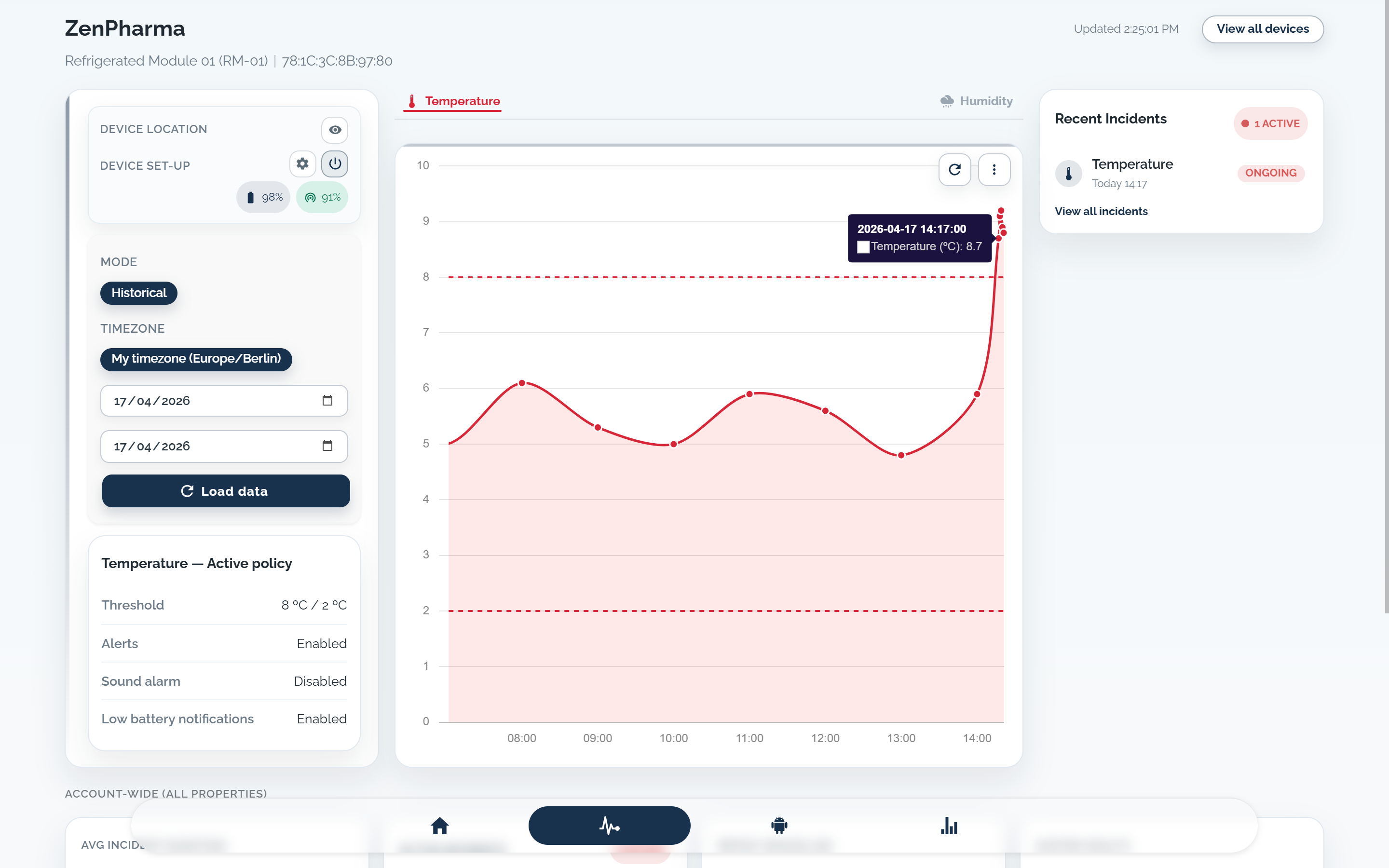
  • The incident view keeps the monitored unit, breached threshold, and excursion window visible from the first alert.
  • Current status, latest reading, and threshold context stay on screen so teams can judge severity before they react.
  • Delivery status, acknowledgement, and escalation timing remain attached to the same incident instead of being split across separate tools.
  • Notes and follow-up stay on the incident, so the team can continue the response without rebuilding context.
Live incident viewThreshold breachResponse state
Ongoing incident view
KRYOS live incident screen showing an ongoing temperature alert, breached threshold, and recent incident status.

Align alert logic to the environments you monitor

Request a demo if you need help defining thresholds, escalation, or delivery channels. If your alert setup is already decided, you can go straight to order.

  • Thresholds tuned by environment
  • Escalation paths that match response teams
  • Traceable incident history