Product feature

Temperature monitoring dashboard for sites, assets, and history.

KRYOS gives teams one cloud temperature monitoring view for live readings, device state, alerts, and historical data across the locations they manage.

  • Teams scan current values, threshold state, device status, and alerts before opening a specific asset.
  • Multi-site temperature monitoring stays readable from one remote temperature dashboard instead of local checks.
  • Historical readings, incidents, reports, and audit-ready records stay connected to the same monitored assets.
Cloud monitoring workspace
Fleet visibility

Current values, threshold state, last update, and device health stay visible across sites.

Site and asset context

Rooms, fridges, freezers, and transport assets stay grouped by the places teams manage.

Operational history

Earlier readings, alerts, notes, reports, and exports remain tied to the asset they describe.

KRYOS cloud temperature monitoring
Live statusSites and assetsAnalyticsAlerts and records
Live state 42 assets visible
Fleet view Sites grouped
Review scope Alerts, reports, history
Connected layers
Live device state
Multi-site visibility
Alert and report continuity
One cloud monitoring workspace keeps site visibility, historical readings, alerts, and records connected from daily checks to audit preparation.

What a temperature monitoring dashboard should make visible

A useful temperature monitoring dashboard brings live values, threshold context, device health, alerts, analytics, and records into one operational view.

Dashboard operating layer

Live status at asset level

Each fridge, freezer, room, or transport asset keeps its current value, threshold state, device status, and last update visible.

Remote view across sites

Teams can scan locations, storage areas, and distributed refrigeration assets from one remote temperature dashboard.

Alert context beside live readings

Out-of-range events, missing data, battery state, and follow-up cues stay close to the readings that need attention.

Historical data stays available

KRYOS retains monitoring data so teams can return to earlier readings, trends, incidents, and review periods when needed.

Reports use the same record

The same record feeds reports, audit logs, exports, and review workflows without moving evidence into a separate tracking process.

From site visibility to review

01. Scan live operations across sites

Teams start with current values, asset state, threshold context, and alert status across the environments they manage.

02. Open the context behind an asset or incident

When a value needs attention, the same path leads into retained readings, alert handling, reports, and audit-ready temperature records.

One view for distributed teams

Operations, supervisors, and QA can read site status without switching between local files, separate dashboards, or delayed exports.

Long-term context stays usable

Persistent history lets teams compare periods, revisit incidents, and understand recurring patterns instead of losing context over time.

Calibration certificates

Sensor certificates stay in the same cloud record

KRYOS can store the real calibration certificate for each sensor, keep it connected to the device record, and make recalibration dates visible before they become a manual tracking problem.

Certificate storageRecalibration dateDownloadable documentation

Review and download

Users can review or download the certificate from the same workspace they use for live readings, alerts, and reports.

Recommended recalibration date

Each sensor record can show the next recommended recalibration date, so QA and operations do not depend on a separate spreadsheet.

Due-date alerts

Recalibration reminders can be handled as part of the monitoring workflow, alongside device health and operating alerts.

Dashboard workspace with scoped access and retained history

The same workspace that supports daily monitoring also supports multi-user teams, role-based permissions, secure login, and controlled access by site, space, or device.

Role-based permissions

Assign roles so administrators can manage users, assets, thresholds, notifications, and site access while operational users focus on monitoring or response.

User-level access and 2FA

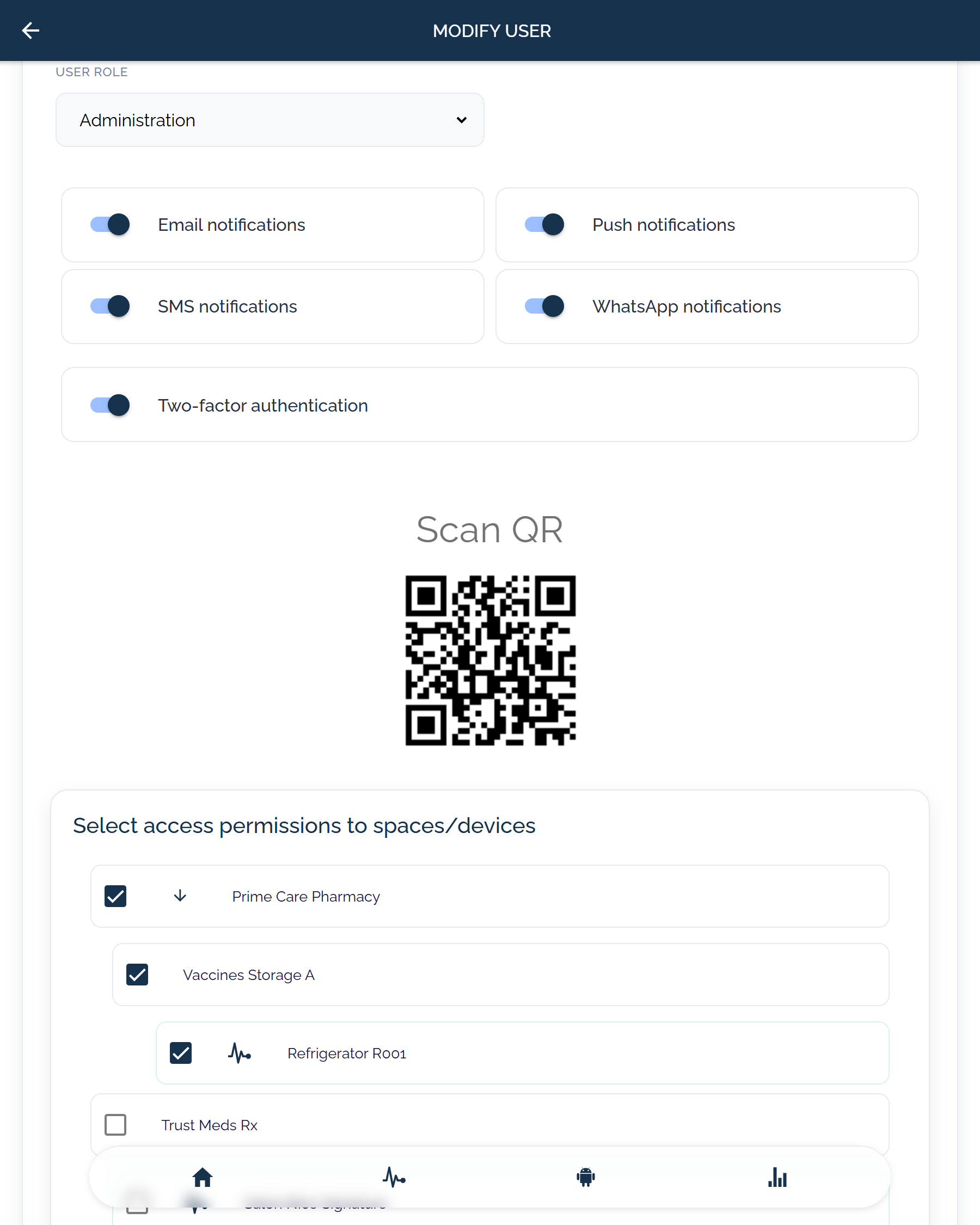
Each user can have email, push, SMS, and WhatsApp notification settings, two-factor authentication, and access scoped to their spaces or devices.

Organization and site separation

Access can be separated by organization, site, space, or device, so distributed teams work inside their part of the temperature monitoring system.

Security and continuity controls

Secure login, encrypted data in transit and at rest, backups, retention policy, and user action audit trails support controlled use of monitoring data.

Multi-language dashboard use

Language options include English, Spanish, French, Russian, German, Dutch, Portuguese, Italian, Polish, Croatian, Czech, and Greek.

Daily monitoring workspace

The remote view is not only an access-control screen. It is the operating layer where teams move from live status into response, analytics, and records.

Live status first

Current values, threshold state, device health, and alert status are readable before teams open a specific asset.

Retained history

Historical temperature data remains available for trend review, recurring checks, investigations, and audit preparation.

Response continuity

Alerts, notes, acknowledgements, and follow-up stay tied to the same monitored asset instead of separate files.

Review and export path

Reports, audit logs, exports, and review records use the same monitoring record that daily teams already use.

User access view
KRYOS modify user screen with role selection, email, push, SMS and WhatsApp notification settings, two-factor authentication, and scoped access to spaces and devices.
User roles and scoped device access A user-management view brings role, alert channels, 2FA, and selected spaces or devices into one access workflow.
User role2FADevice scopeEmail, push, SMS, WhatsApp

Shape the temperature monitoring dashboard around your sites

Request a demo if you need to map assets, sites, alert channels, user access, and historical review into one operating view. If the scope is already clear, you can move into pricing.

  • Multi-site visibility
  • Retained history
  • Connected alerts and records